Case study / a mixtape, from track list to a burned disc

MXTP MKR

Updated Oct 19, 2026 · Tauri desktop app · Windows and Linux

I wanted to make mixtape CDs that look like real releases: the right songs in the right order, a printed front insert, a tray card, a booklet with the lyrics, and a disc that shows the track names in the car.

Doing that by hand means juggling tools that don't talk to each other. The music lives in a library app. The print sizes live in a duplicator's template ZIPs. Booklet page order is folding math you get wrong the first time. The burner wants a disc image in a specific layout. MXTP MKR puts all of it in one desktop app. It's a personal tool, built for my own library and drives, not a product.

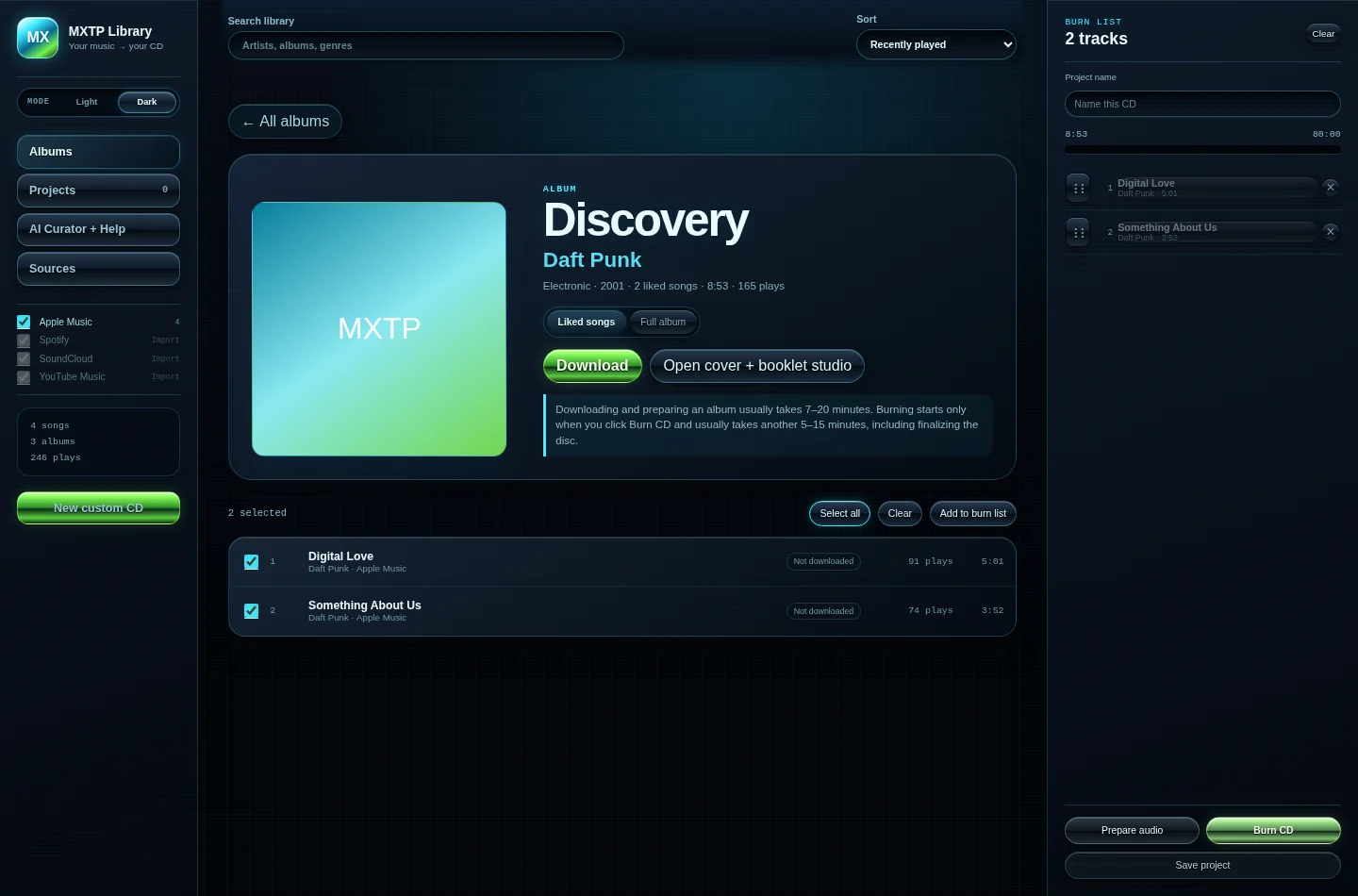
mxtp mkr · library and burn list
The MXTP MKR library view in dark mode: a sidebar with Albums, Projects, AI Curator and Sources, an album page for Daft Punk's Discovery with two selected tracks, and a burn list on the right showing 8:53 of 80:00 used with Prepare audio and Burn CD buttons. Built from fixture data.
What it does

Pick the songs, design the case, burn the disc.

01

Start from the library you already have

The app reads the Apple Music library database straight off disk. That file is undocumented: a plain header, then an AES-128 encrypted payload, then zlib. The Rust side decrypts and parses it, so the whole library shows up as albums with their real cover art and play counts, no export step. Spotify, SoundCloud and YouTube Music data exports can be imported next to it.

02

Fill a disc, not a playlist

Tracks go into a burn list with a live meter against the 80-minute limit of an audio CD. The list reorders by drag or keyboard and saves as a project. A small rule-based curator can also build a mix from plain requests like "two grunge tracks instead of those", and it remembers artists you said you don't want.

03

Print-ready inserts and booklets

Front insert, tray card, disc face, and saddle-stitch booklets from 4 to 28 pages. Each piece exports as a PDF with media, bleed and trim boxes at the sizes a duplicator expects. Track lists and lyrics come from MusicBrainz and lyric sites, and cover art can be the real album cover or a generated one.

04

A 3D case and a real burn

An interactive jewel case shows the art on every surface before anything is printed. Then the app converts the audio, builds a CD-DA image with CD-Text, and writes the disc: IMAPI2 on Windows, cdrskin on Linux, with a simulate mode for testing.

How it works

A React front end, a Rust back end, one source of truth for sizes.

It's a Tauri 2 app. The React side (about 14,000 lines of TypeScript, not counting tests or generated files) holds the project: the burn list, which artwork sits in which print slot, and the booklet pages. Anything that touches the disk, the network or the burner goes through a Tauri command into Rust (about 6,900 lines).

Print sizes are generated, never typed in. I downloaded the Disc Makers template set, measured the bleed, trim and safety boxes out of the template PDFs into a CSV, and scripts/gen-dimensions.mjs turns that CSV into a typed registry. Components ask for a size by template ID. No component holds a hardcoded inch value.

The booklet is three steps. Pagination flows the track list and lyrics into each page's safe area. impose() maps reader pages onto printer spreads, so a 16-page booklet prints page 16 next to page 1 on the outside of the first sheet. Then the PDF writer lays each spread out at the exact media size with the fold line where the template puts it.

The burn path is plain sector math. ffmpeg converts every track to 44.1 kHz, 16-bit stereo PCM. The Rust burn module lays the tracks out in 2,352-byte sectors with a 4,500-sector lead-in, 150-sector (2 second) pregaps and a lead-out, and rejects anything over 99 tracks or past the disc's sector bound. CD-Text packs carry the album, artist and track titles, each with its CRC.
01 Sources Apple Music db exports · MusicBrainz 02 Project React state burn list · art slots 03 Print size registry paginate · impose · PDF 04 Burn CD-DA + CD-Text IMAPI2 · cdrskin From library to disc The front end owns the project. Rust owns the disk, the network and the burner. Print and burn both read the same project, so the booklet and the disc always match.
What was hard

Three bugs that taught me something.

bug: every lyric page wrapped at about 36 characters

Booklet lyric pages came out in a half-width column. The cause was in the size generator, not the layout code. Disc Makers booklet templates draw the safety guide per page, 4.5 by 4.5 inches for a 16-page CD booklet. The generator halved it like it halves the spread trim and bleed, so every page got a 2.25-inch safe area.

The fix was one rule in gen-dimensions.mjs: if the recorded safety already fits inside half the spread, it is the page safety as is. I added an in-app preview of every booklet page in the same commit, so a layout bug like that shows up on screen instead of on paper.

port: the Windows disc image was wrong for Linux

The Windows burner writes a raw image that includes the lead-in and lead-out, because IMAPI2's raw mode expects them. Porting to Linux, I could not reuse that image. With cdrskin -sao the drive writes the lead-in and lead-out itself. So the Linux path has its own audio image and cue sheet builder, plus a CD-Text pack file, and the Windows-only code sits behind cfg(windows).

rule: a placeholder must never pass for real art

Cover art goes through a selectable backend: Pollinations by default (no key), Cloudflare Workers AI, a codex CLI adapter, or a mock. When a codex CLI update removed image generation from its exec mode, the adapter started exiting cleanly with no image. Rather than fall back quietly, it now fails with an error that says what changed and which backend to use. When no image backend is connected, the art panel shows a warning under the placeholder cover, so a stub is never presented as generated art.

Results

A real disc, and a test suite that checks the math.

On August 24, 2026 the app took a 12-track album from search to a finished audio CD: it downloaded the tracks, wrote the disc through IMAPI2 in raw DAO mode, finalized it and ejected it.

The repo has 465 Vitest tests across 41 files, 124 passing Rust unit and integration tests covering the burn layout, CD-Text encoding, PDF page boxes, booklet imposition and the research adapters, and 400 end-to-end tests that drive the real app through WebDriver on Linux. The Linux burn path is covered by those tests but has not burned a real disc yet, and I say so in the README.

Stack

What it's built with.

Languages
TypeScriptRustPythonPowerShell
Desktop
Tauri 2.deb + AppImageNSIS + MSI
UI
React 18Vitethree.js@react-three/fiberpdf-lib
Backend
reqwestlopdfrusqliteaes + flate2windows crate (IMAPI2)
Media
ffmpegyt-dlpcdrskin
Data
MusicBrainzCover Art ArchivePollinationsCloudflare Workers AI
Tests
VitestTesting Librarycargo testPlaywright